eurorack
Mutable Instruments - Marbles: Truchets
A reimagining of Mutable Instruments Grids drum pattern generator, now living inside Marbles. Truchets is built on Marbles 1.3, it adds a new T-side mode and new X-side features while keeping all original Marbles functionality intact.
For the latest update file go to the release page.
When you need instructions on how to update your marbles go to the original manual.
Contents
- Button Behavior
- Marbles Enhancements
- Activating Grids Mode
- Grids Mode Outputs
- Standard Controls
- X Shift Layer - Knobs
- X Shift Layer - Buttons
- Advanced Settings Layer
- Calibration (1.2)
- Patching Ideas
- Credits
Button Behavior
T Mode and X Mode buttons use tap and long-press to navigate between modes:
| Press Duration | Behavior |
|---|---|
| Short tap (< 275ms) | Cycle within current bank |
| Medium press (275ms–2s) | Ignored (prevents accidental changes) |
| Long press (≥ 2s) | Switch between banks (no blink/blink) |
Marbles Enhancements
These features extend the standard Marbles functionality and are available outside of Grids mode.
X Modes
The X Mode button now has 6 modes split into two banks:
| Bank | LED State | Name |
|---|---|---|
| Basic | Solid Green | Identical |
| Basic | Solid Orange | Bump |
| Basic | Solid Red | Tilt |
| Alternative | Blinking Green | Round Robin |
| Alternative | Blinking Orange | Envelope |
| Alternative | Blinking Red | Acid |
Short tap cycles within the current bank. Long press switches between banks.
Round Robin (Blinking green) (1.1)
Cycles through X1/X2/X3 outputs one at a time. Each clock pulse advances to the next channel. When clock is not patched the clocking signal comes from T2.
In normal green mode, all three X outputs share the same random sequence in a shift-register style — X1 gets the newest value, X2 gets the previous, and X3 the one before that. In round robin, only one output updates per clock tick while the other two hold their last value, cycling X1 → X2 → X3.
Envelope (Blinking orange) (1.1)
Generates attack-decay envelopes on X outputs triggered by t1t2t3 or clock input.
| Control | Function |
|---|---|
| Spread | Random envelope time distribution |
| Bias | Envelope length |
| Steps | Attack/decay ratio |
X Range tap changes retrigger behavior (independent of the voltage range used in other modes):
| LED State | Retrigger Mode |
|---|---|
| Green | Hard reset on every trigger |
| Orange | Only retrigger after attack phase (Serge-style) |
| Red | Only retrigger after envelope completes (legato) |
With external clock, envelopes trigger round-robin style (one channel per trigger). With internal clock, all channels trigger independently.
Long-press X Range still opens scale select (the scale quantizes the Y output). X Ext is disabled in envelope mode — External/Transpose have no meaning for envelope outputs, and your setting is kept for the other modes.
Acid (Blinking red) (1.2)
A TB-303 style generative acid sequencer on the X section, following the pattern rules of the TB-3PO Hemisphere applet. The X trio becomes one voice:
| Output | Function |
|---|---|
| X1 | Pitch (1V/oct, quantized to the selected scale, with ~60ms exponential 303 slides) |
| X2 | Trigger — clean 5V gate, tied through slides. 65% of the step, 85% on accents |
| X3 | Velocity — 0V rest, 1.5V normal note, 5V accent, flat across the note, same length as X2 |
Driving Plaits Palette: patch X1 → V/Oct, X2 → TRIG, X3 → LEVEL. The accent behaviour — the two velocity levels, the gate lengths, and the way accents and slides interact — is tuned around Palette’s acid model, so normal steps sit soft and dark while accents hit loud and bright.
One setting on the Plaits side:
level_cv_optionmust be 0 (“cv control of level”), which is the factory default. At 1 or 2 the LEVEL input is rerouted to DECAY and accents silently stop responding.
Knob functions:
| Control | Function |
|---|---|
| Spread | Pitch pool: root-only drone → half-steps → triad → full scale → ±1 octave jumps. Note repeats fade out as you turn up |
| Steps | Gate density |
| Bias | Slide/accent bias. Noon = authentic 303 (~18% slides, ~16% accents). CCW = more slides, CW = more accents |
X Deja Vu locks the riff, exactly as it does in the other X modes. With it off the line regenerates forever; tap it and the pattern loops — same notes, gates, slides and accents every pass. Deja Vu Length sets the loop length, 1 to 16 steps. At 16 in Grids mode the riff lines up with one drum bar.
Pitch, gate/accent and slide each run on their own stream, so a locked riff repeats exactly rather than drifting one element at a time.
X Ext in acid toggles Normal and Transpose only — External has no meaning when the X trio is a single voice, so it is skipped. In Transpose, the Spread CV input shifts X1 only; the trigger and velocity outputs are left alone.
X Range short tap selects the scale — tap to step through the six scale presets plus a chromatic mode (LED off). The X Range LED shows the current scale (green/yellow/red + blinking for presets 4–6, off for chromatic).
Hold X Range for a momentary acid fill — the line snaps back the instant you release, and the X-section LEDs flicker while it’s active. Each hold picks one of three fills at random (never the same one twice in a row):
| Fill | What it does |
|---|---|
| Roll | Every step gated, accents alternating — a driving, pumping 16th-note stutter |
| Octave run | Frequent upward octave leaps, always new notes — the classic acid reach-up |
| Slide run | Every step slides — a continuous gliding portamento worm |
All three fills force enough gate density to be heard, even with Steps turned way down.
One step per clock: external X clock when patched, otherwise the master T clock. In Grids mode the bassline runs at 16ths so a 16-step pattern aligns exactly with one 32-step drum bar.
Switching into acid while Grids is running snaps the riff to its first step at the top of the next drum bar, so it drops in on the downbeat instead of wherever the pattern happened to be. The drums keep playing untouched.
X Ext Modes (1.1)
X Ext cycles through 3 modes:
| LED State | Mode | Function |
|---|---|---|
| Off | Normal | Standard behavior |
| Solid Green | External | Original external input behavior |
| Blinking Green | Transpose | Spread CV input becomes V/Oct transposition |
In Transpose mode, the Spread CV input applies a pitch offset to all three X outputs. The input uses a V/Oct correction curve for tracking accuracy. While the hardware is not made for it this curve tries to fix that.
Explicit Reset (1.1)
Press T Mode + X Mode to cycle through 4 states:
| State | T Section Reset | X Section Reset |
|---|---|---|
| Off | Disabled | Disabled |
| 1 | Enabled (T Jitter input) | Disabled |
| 2 | Disabled | Enabled (X Steps input) |
| 3 | Enabled | Enabled |
After toggling, T Deja Vu and X Deja Vu LEDs flash for 1 second to indicate which sections are active.
Activating Grids Mode
Long press T Mode while on drum mode (solid red) to enter Grids mode (blinking red).
To exit, long press T Mode without changing anything in the advanced layer.
Grids mode outputs
| Output | Function |
|---|---|
| T1 | Kick trigger |
| T2 | Hi-hat trigger |
| T3 | Snare trigger |
| Y | Accent output |
| X1/X2/X3 | Random voltages |
X1/X2/X3 are following the standard Marbles behaviour. All X controls still function like the original firmware. X2 follows hihat pattern instead of master tempo source.
In acid mode the X outputs are the bassline instead — pitch, trigger and velocity, see Acid. The T side is unchanged, and the two run off the same clock so the line stays locked to the drums.
Standard Controls
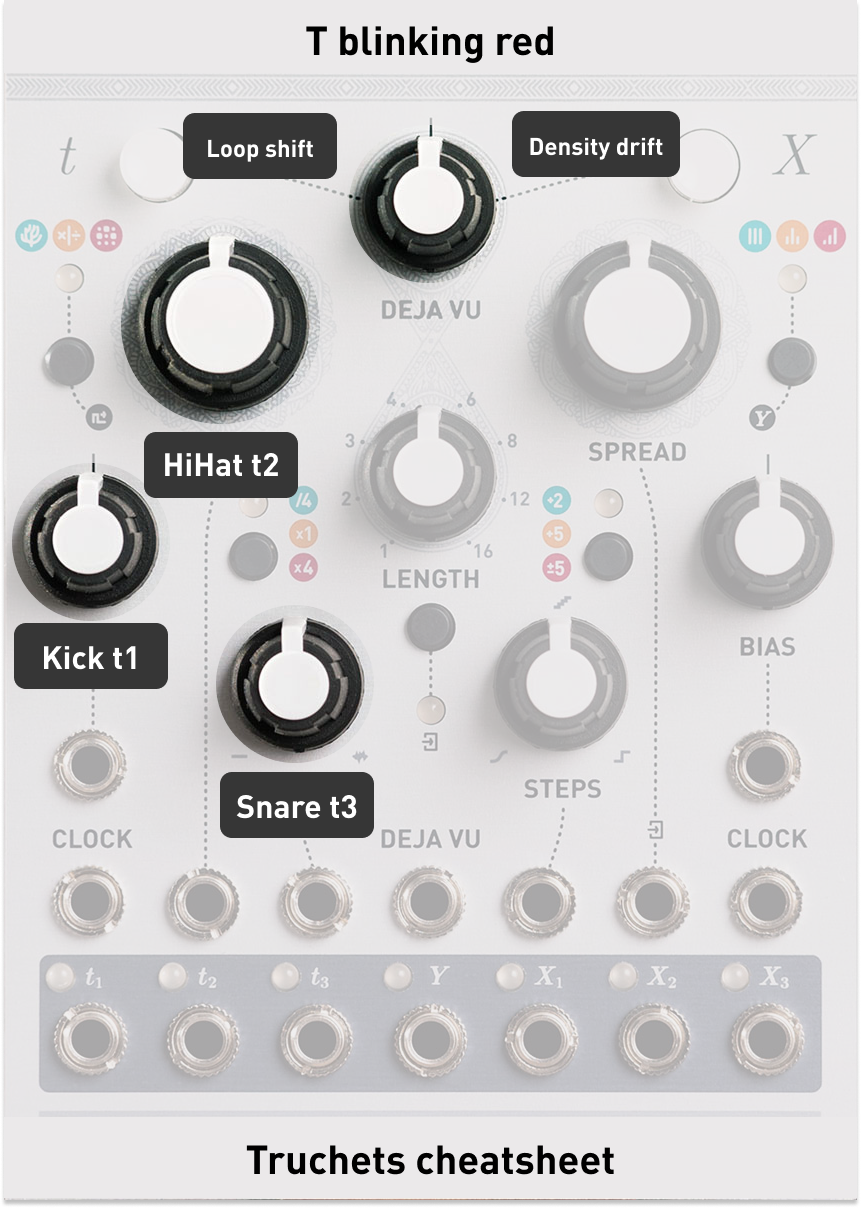
Density Knobs
| Knob | Controls |
|---|---|
| Bias (T) | Kick density |
| Rate | Hi-hat density |
| Jitter | Snare density |
All three respond to CV input.
Drum Fill (hold T Range) (1.2)
Hold T Range in Grids mode to trigger a momentary drum fill; the pattern snaps back the instant you let go. A short tap still cycles the clock range as normal. Each hold picks one of three fills at random (never the same one twice in a row):
| Fill | What it does |
|---|---|
| Build | Staged build-up over ~2 seconds of hold: hats densify first, snare joins mid-hold, kick and chaos arrive for the peak |
| Roll | Snare hits every step (a true roll), kick/hats pulled back |
| Scatter | Jumps to a random spot in the drum map, moderately busy — a different groove, not just “more” |
Deja Vu (T Side)
The Deja Vu section controls pattern looping:
- T Deja Vu Button: Tap to toggle loop lock on/off
- Deja Vu Length: Sets loop length (when locked)
- Deja Vu Amount: Controls loop behavior (see below)
Deja Vu Amount Behavior
| Direction | Effect |
|---|---|
| Left | Chance to shift loop start point +1 step each cycle |
| Noon | Neutral |
| Right | Chance for density drift on steps (clears when unlocked) |
When the knob is fully left the chance to shift is 100%.
Density drift is inspired by the Chaos parameter. The key differences: Chaos always adds hits (fills), while Density drift can both add and remove hits. Chaos is always random (even when the loop is locked), while Density drift locks with Deja Vu. Chaos re-rolls once per loop cycle, while Density drift is applied per step.
X Shift Layer - Knobs
Hold X Mode and turn knobs to access hidden parameters.
All shift layer parameters have a neutral position at noon (12 o’clock), meaning they have no effect on the sound until you turn them.
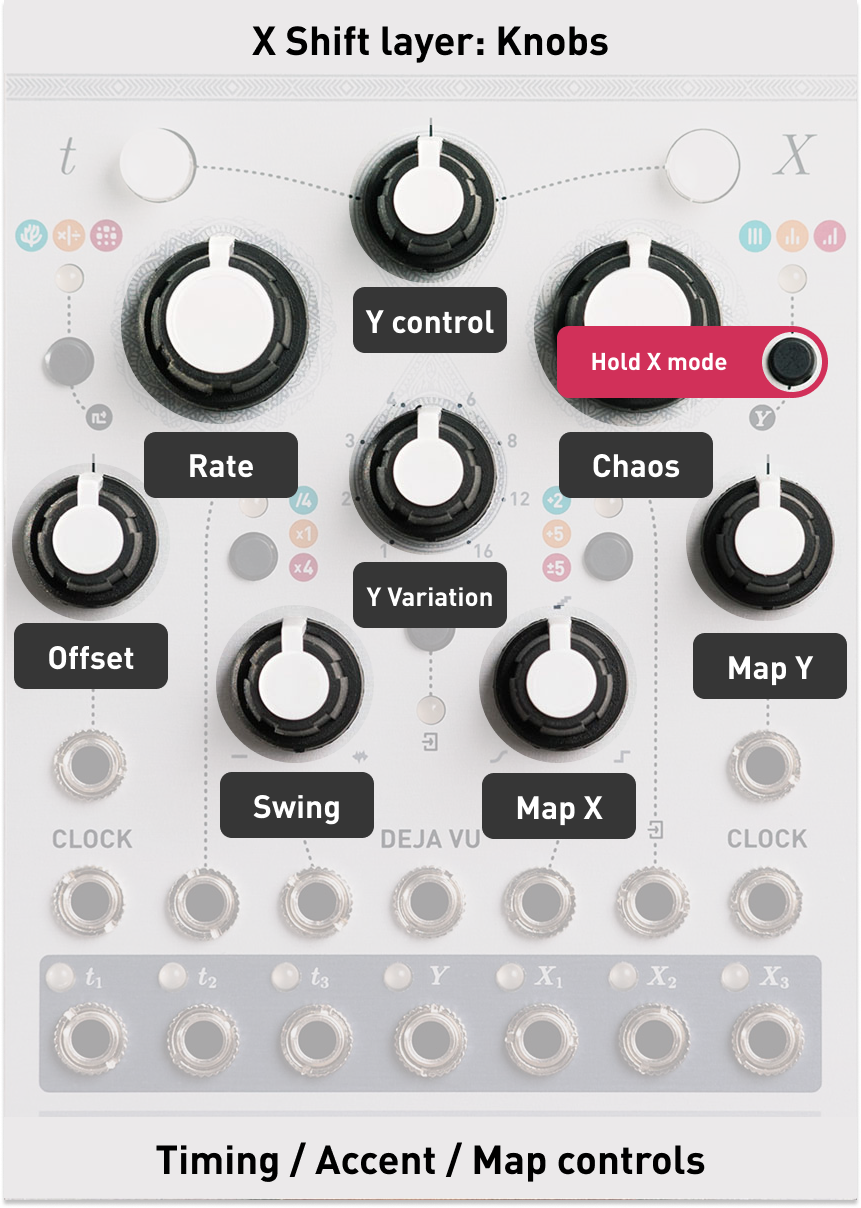
Groove Offset (x Bias)
| Position | Effect |
|---|---|
| Far left | Kick +3 steps late |
| Center left | Kick +1 and +2 steps late |
| Left | Kick micro-timing late (up to 50%) |
| Noon | Neutral |
| Right | Snare micro-timing late (up to 50%) |
| Center right | Snare +1 and +2 steps late |
| Far right | Snare +3 steps late |
Rate (Rate)
The same Rate/tempo control from the standard Marbles interface, moved here to free up the knob for hi-hat density.
Swing (Jitter)
| Position | Effect |
|---|---|
| Left | Classic swing |
| Noon | Neutral |
| Right | Tresillo swing |
Both swings go to 50% max.
Map X & Map Y (Steps & x Bias)
Change the pattern coordinates on the current bank.
On the Divisions bank the two knobs work differently: Map X morphs the metric grid itself — straight binary divisions on the left, crossfading into a triplet grid on the right (quarter/8th/16th triplets), with hybrid grids in between. Map Y spreads the three channels apart in phase: the kick stays anchored, the snare shifts up to 7 steps, the hats twice that — turning parallel dividers into interlocking canons.
Chaos (Spread)
| Position | Effect |
|---|---|
| Left | Random tempo jitter (humanize) |
| Noon | Neutral |
| Right | Density Chaos (ghost notes / fills) |
The left side of the chaos knob uses the normal Jitter logic from the other modes.
Accent Control (Deja vu)
| Position | Effect |
|---|---|
| Far left | Kick accent only |
| Left | Hi-hat accent only |
| Center-left | Snare accent only |
| Noon | All accents combined (original behaviour) |
| Right to far right | All accents combined, lowering threshold |
192 is the original grids threshold for an accent and is used on the left to noon side of the knob.
Lowering threshold creates more gates. If accent control is fully to the right an accent will always be fired when any of the outputs are firing.
Accent Variation (Length)
| Position | Effect |
|---|---|
| Left | Random voltage window |
| Noon | Neutral (5V gates) |
| Right | Velocity-sensitive gates (stronger accents = higher voltage) |
Both sides start as fixed 5V gates near noon. Turning the knob further from center widens the voltage window, reaching the full 0V–5V range at the extremes.
The random voltages are locked with the Deja vu function.
X Shift Layer - Buttons
Hold X Mode and press buttons to access CV routing and bank select.
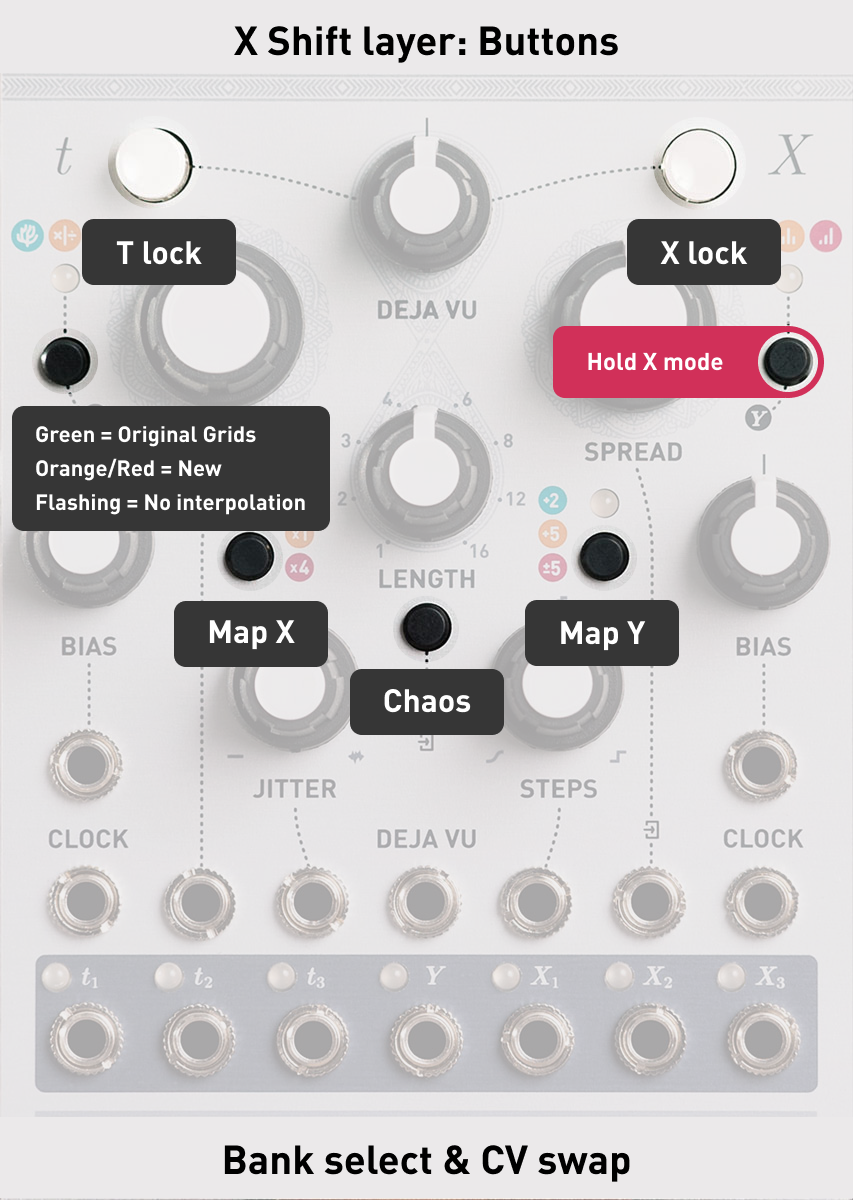
Pattern Banks
Hold X Mode + tap T Mode to cycle through pattern banks:
| LED State | Bank |
|---|---|
| Solid Green | OG Grids |
| Solid Orange | Electronic |
| Solid Red | Breakbeat |
| Blinking Green | OG Grids (no interpolation) |
| Blinking Orange | Electronic (no interpolation) |
| Blinking Red | Breakbeat (no interpolation) |
| Off | Divisions — each density knob is a clock divider (1 → 32 hits/bar); accents follow metric strength |
Interpolation vs No Interpolation: With interpolation (solid LED), patterns morph smoothly between the 25 positions in the 5x5 grid as you adjust Map X/Y (Same as the original Grids). Without interpolation (blinking LED), Map X/Y snap to the nearest of the 25 grid positions — no morphing, just the raw patterns.
CV Swap Routing
| Hold X Mode + Press | LED State | CV Source |
|---|---|---|
| T Range | Off | No CV |
| Green | Steps CV → Map X | |
| Blinking | Bias (T) CV → Map X | |
| X Ext | Off | No CV |
| Green | Spread CV → Chaos | |
| Blinking | Rate CV → Chaos | |
| X Range | Off | No CV |
| Green | Bias (X) CV → Map Y | |
| Blinking | Jitter CV → Map Y |
The routing follows a left-to-right logic across the panel. The buttons (center) map to the shift layer knobs (right side): one press assigns the CV input next to that knob (green), a second press mirrors it to the corresponding CV input on the left side of the module (blinking).
Deja Vu CV Swap
| Hold X Mode + Press | LED State | Function |
|---|---|---|
| T Deja Vu | Off | Normal behavior |
| Green | Deja Vu CV gates T-side lock | |
| X Deja Vu | Off | Normal behavior |
| Green | Deja Vu CV gates X-side lock |
When enabled, a gate signal (+2.5V) on the Deja Vu CV input flips the lock state.
Advanced Settings Layer
Hold T Mode and press buttons to toggle advanced settings.
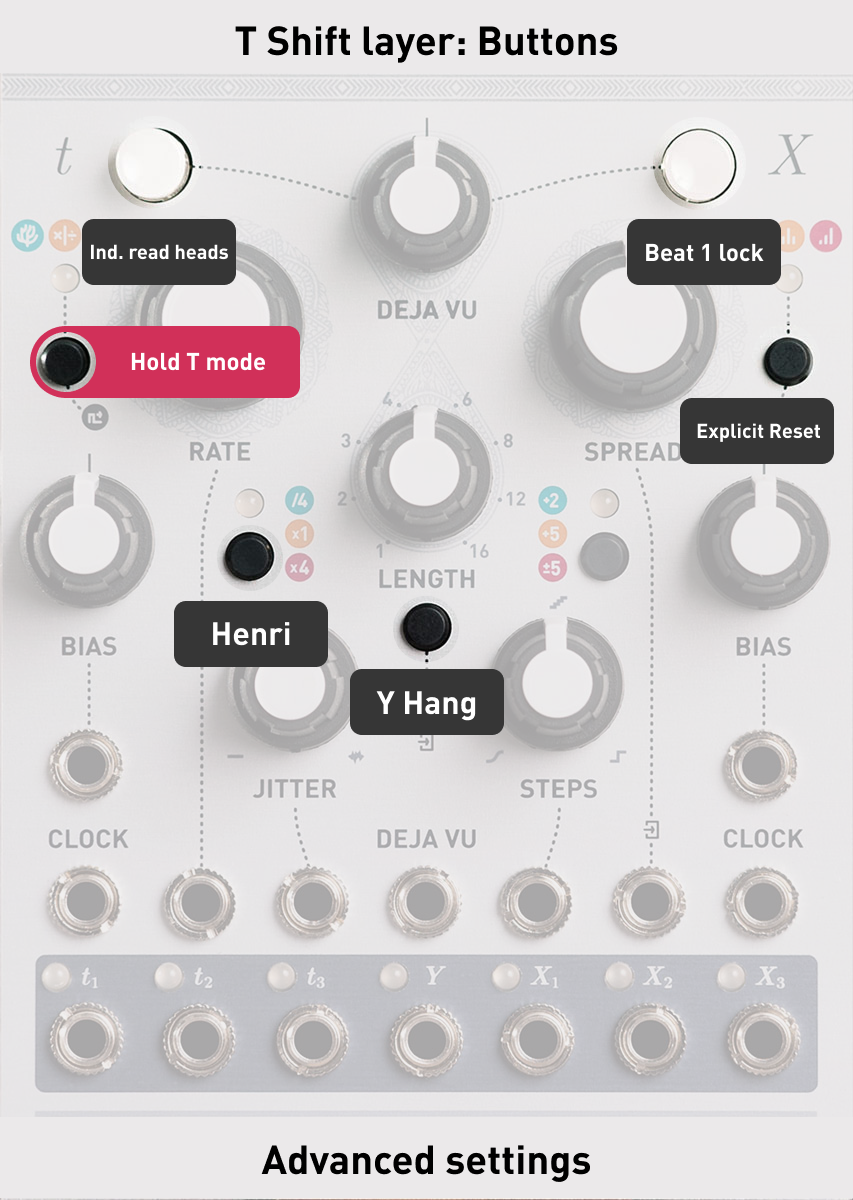
| Hold T Mode + Press | Setting | Off (default) | On (LED lit) |
|---|---|---|---|
| T Deja Vu | Loop playhead | Shared playhead | Independent playhead |
| X Deja Vu | Loop start | Dynamic (from current step) | Always from beat 1 |
| T Range | Read mode | Normal | Henri |
| X Ext | Accent hang | Normal gates | Hanging accents |
| X Range | Knob swap | Normal knob locations | Knobs swapped |
| X Mode | Explicit reset | Off | 4 states (see Explicit Reset) |
Setting Descriptions
Independent Loop Playhead (T Deja Vu)
When on, the loop has its own playhead separate from the main pattern. When you unlock, playback stays in sync with where the pattern would have been.
Loop from Beat 1 (X Deja Vu)
When on, loops always start from step 1 of the pattern instead of the step where you activated the loop.
Henri Mode (T Range)
Switches pattern reading between Normal (original Grids algorithm) and Henri (alternate reading from Grids4Live Max plugin). Henri mode produces different rhythmic relationships between kick, snare, and hi-hat.
Accent Hang (X Ext)
When on AND an accent variation is active, accents will sustain until the next accent fires.
This turns accent into a sample and hold output driven by accent and the current accent variation.
Knob Swap (X Range) (1.1)
When on, the Marbles knobs (Steps, Bias, Spread) directly control Grids coordinates (Map X, Map Y, Chaos). Marbles X parameters use stored alternate values. When off (default), Marbles knobs control Marbles X parameters and Grids coordinates comes from the shift layer.
When toggling, current knob positions are captured to prevent parameter jumps.
Knob swap is independent of CV swap. CV swap routes CV inputs to Grids coordinates, while knob swap changes which parameters the physical knobs control. Both can be used at the same time.
Explicit Reset (X Mode) (1.1)
Now supports 4 independent states for T and X sections. See Explicit Reset for full details.
Gate length control (t Bias & Jitter)
While Holding T Mode the gate configuration parameters are still accessible.
Calibration (1.2)
Marbles’ calibration gesture (T Range + X Range) is unchanged, but it is now blocked while the T side is in Grids mode or the X side is in acid mode. In both, those buttons are fill triggers, and holding them together mid-set was too easy a way to fall into calibration by accident.
To calibrate, leave Grids (long press T Mode) and take the X side out of acid, then press T Range + X Range as usual. Both mode settings survive a power cycle, so if the gesture seems dead, that is the first thing to check.
Patching ideas
- Grids mode can still feel really random by turning Chaos fully clockwise or counter clockwise and having a high swing value.
- Use a small amount of Jitter for a humanized feel.
- Turning on Henri mode can give you a B side of a beat. Turning it on and off can give some nice breaks.
- Self patching Marbles X side to any grid parameter can give great results.
- Having a high spread and steps on the X side can give random gate outputs driven by the Grids gate generation. Essentially creating 7 gate outputs.
- Having a offset module patched to Map/Chaos cv in can give you direct control over these parameters without using the shift layer. Think of Stages, Shades or Blinds
- Transpose mode lets you transpose X outputs with a sequencer or keyboard CV patched to the Spread CV input. Or you can add a extra lfo on top of the randomness.
Credits
- Original Marbles & Grids firmware by Émilie Gillet (Mutable Instruments)
- This very handy grids pattern website by Michael Forrest
- VCV Rack Topograph for all the A/B Testing by Dale Johnson
- Henri mode based on Grids4Live by Henri David
- Acid mode pattern rules from the TB-3PO Hemisphere applet by Logarhythm, maintained by djphazer (Phazerville Suite)